


|
Name |
PaperKnife |
|---|---|
|
Category |
Tools |
|
Developer |
potatameister |
| Last version | 1.0.9 |
|
Updated |
|
|
Compatible with |
Android 5.0+ |
Introduction to PaperKnife APK
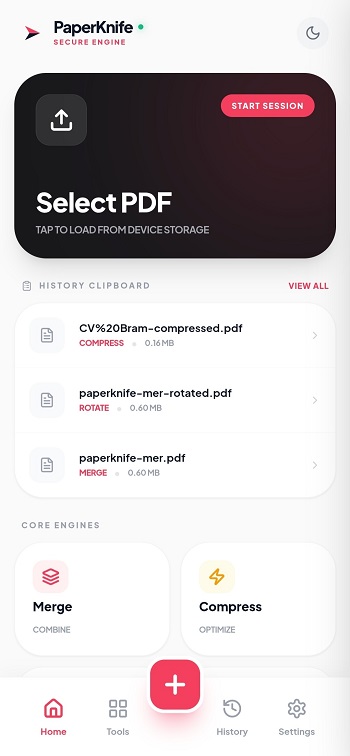
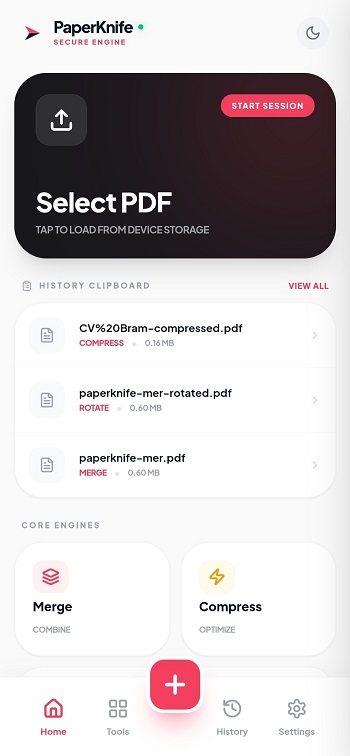
PaperKnife is a mobile utility app built for handling PDF files directly on your device. It works as an offline document toolkit, allowing users to edit, convert, secure, and manage PDFs without sending files to external servers. The Android version is packaged as an APK, giving users the option to install it manually, while the web version can run in a browser with offline support.
The main goal of PaperKnife is simple: keep your documents private while giving you full control over them. All processing happens locally on your phone or in your browser. That means bank statements, contracts, IDs, or school documents stay on your device. No cloud uploads, no background syncing, and no tracking systems running behind the scenes.
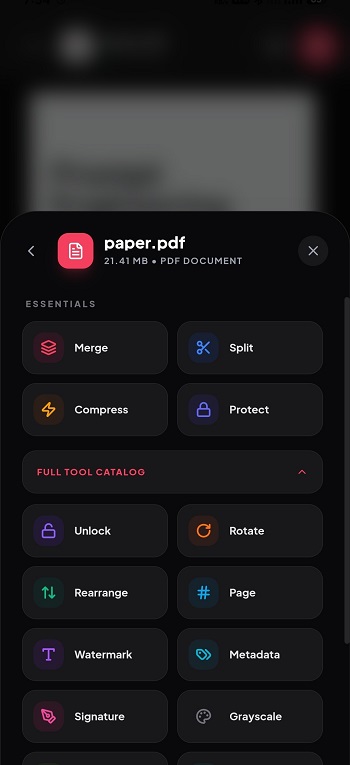
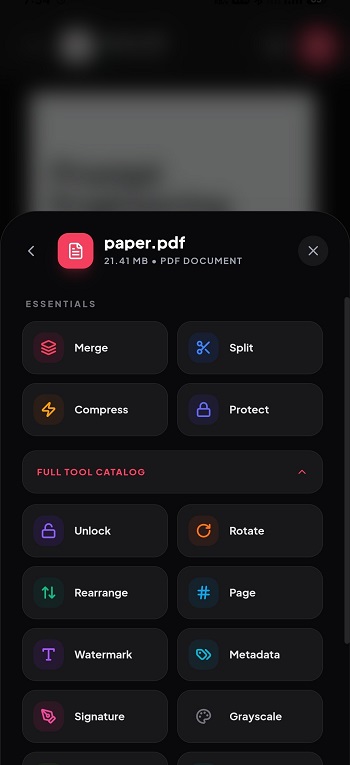
The app includes practical tools most people actually need. You can merge multiple PDFs, split pages, rotate or rearrange them, and compress large files to save storage space. It also converts PDFs to images or text, adds password protection, removes passwords, and even cleans hidden metadata like author details. There’s also a built-in electronic signature tool for signing files quickly without printing anything.
One of the biggest advantages is its lightweight design. It runs smoothly on most Android devices and doesn’t overload system resources. The interface is clean and easy to understand, so you won’t waste time figuring out where things are. Since it works offline, it’s especially useful in situations with weak internet connections or when handling sensitive documents in public spaces.
There are a few limitations to keep in mind. Because it’s distributed as an APK outside major app stores, users need to enable installation from unknown sources. Updates may require manual downloads. And like any APK file, safety depends on downloading it from a reliable source.
PaperKnife is ideal for students, freelancers, remote workers, and anyone who regularly deals with PDFs. It’s particularly helpful for people who value privacy and want document control without relying on cloud-based services. If you often edit contracts, submit forms, or organize digital paperwork, this app fits naturally into that workflow.
FAQs PaperKnife
What is PaperKnife used for?
+
PaperKnife is a mobile PDF utility app used to merge, split, compress, convert, sign, encrypt, and clean metadata from PDF files directly on your device without uploading them online.
Does PaperKnife work without an internet connection?
+
Yes. All file processing runs locally on your phone or browser, so you can use it fully offline and keep documents private.
Is PaperKnife APK safe to install?
+
It can be safe if downloaded from a trusted source. Since it is an APK file, users should verify the source and scan the file before installing.
Can PaperKnife remove passwords from PDFs?
+
Yes. The app includes tools to add or remove PDF passwords locally, as long as you have proper access to the file.
Who should use PaperKnife?
+
It’s suitable for students, office workers, freelancers, and anyone who frequently handles sensitive PDF documents and prefers offline privacy-focused tools.
Discover More Interesting Apps
-

Zapya
v7.1.1
25.66 Mb
Updated -
Mod
DevCheck
v6.63
30.93 Mb
Updated -
AGC ToolKit Pro
v7.7.4
49.00 Mb
Updated -
Mod
PDownloader
v1.0.44
108.14 Mb
Updated -
Mod
InSave
v2.1.6
31.69 Mb
Updated -
Mod
Redfinger
v1.9.14.73
111.05 Mb
Updated -
iGOT Karmayogi
v5.0.10
51.68 Mb
Updated -
Flezen
v1.9.2
63.87 Mb
Updated -
Apkm to
v2.8.2
24 MB
Updated -
AdGuard VPN
v2.17.2
51.00 Mb
Updated










Share Your Thoughts